
FAQ - Frequently asked questions about ticketing
Find all the answers to your questions about Billettera, your free online ticketing solution
Choix et démarrage
All Billettera features are available regardless of your sector. Sector pages simply highlight the most common configurations for each event type (numbered vs general admission, typical pricing, relevant options). You can mix and match as you see fit.
Yes. A single organizer account can host as many events as you want, across all sectors. Each ticketing is independent: pricing, seating plan, promo codes, communications.
No. All features (seating plan, general admission, promo codes, packs, calendar ticketing, POS mode, invoices, QR e-tickets, mobile check-in) are available for all sectors without exception. You activate those you need.
Billettera pricing is identical regardless of your sector: ticketing creation is free, service fees are paid by the buyer (transparent at checkout) and the organizer pays no subscription.
Yes. You can create your new ticketing on Billettera and put it online in parallel with your current solution. No mandatory data migration — you decide when to switch your communications to the new URL.
Absolutely. The 20 listed sectors are the most common, but Billettera is usable for any event with paid or free ticketing. If your case is very specific, contact us so we can validate the configuration together.
Yes. Billettera holds an NF525 self-certification compliant with French tax regulations for cash register software, across all sectors. The fiscal chain (SHA256, immutable sequence) is applied natively to all your transactions.
Getting started and pricing
Yes, Billettera is completely free. We take no commission on your ticket sales. You keep 100% of your revenue. The only fees that apply are Stripe payment fees (approximately 1.5% + €0.25 per transaction) for online sales, which are standard bank fees charged by Stripe.
You can create your first ticketing in less than 15 minutes. Registration is free and requires no credit card. The intuitive interface guides you step by step: event creation, pricing setup, publication.
For numbered seating with a custom seating plan, allow a little more time to design your layout.
No limits! Sell 10, 100, 1,000 or 10,000 tickets as needed. Our system processes large orders in optimized batches to ensure maximum performance, regardless of your event size.
Unlike other platforms that charge per ticket sold, Billettera imposes no additional volume-based costs.
Billettera adapts to all your events: shows, concerts, theatre, conferences, sports events, training sessions, private parties, festivals... Thousands of tickets are sold every month by our users for events of all sizes.
You can create events with multiple dates (performances) and manage each schedule independently.
Seating plan and placement
Yes! Billettera offers a free and intuitive drag-and-drop seating plan editor. Visually create your stands, rows and seats with automatic numbering.
Define differentiated pricing zones (Orchestra, Balcony, VIP, Category 1, 2, 3...) with color codes for clear visual identification. Your spectators can then choose their seat directly on the interactive plan during purchase.
Open seating: ideal for standing concerts, festivals or conferences. You simply define the number of seats per zone without creating individual seats. Spectators choose their zone but not their exact seat.
Numbered seating: perfect for theatres, stadiums or concert halls. Each seat has a unique identifier (row + number). The system automatically manages real-time availability to prevent double bookings.
Our system manages 4 distinct states for each seat:
- Available : the seat can be reserved
- Reserved : reservation in progress (active cart, expires after 30 min)
- Sold : ticket purchased, seat unavailable
- Blocked : reserved for internal use (stage management, accessibility, etc.)
Online ticket sales
Billettera automatically generates a custom sales page for each event you create. This page is hosted directly on our platform and is the main way to sell your tickets online.
When you publish your event from your admin interface, your sales page becomes publicly accessible on Billettera.com. It appears in our event list, visible to all site visitors.
Each sales page has a custom URL based on your event name. The title, description and Google SEO tags are automatically optimized for optimal search engine ranking.
Promote your Billettera sales page on your social networks, newsletters and marketing materials. Your community can easily buy their tickets from a unique and memorable link.
Yes, in addition to your Billettera sales page, you can also integrate your ticketing directly on your own website using our white-label integration widget.
The widget is 100% responsive (desktop, tablet, mobile), includes the interactive seating plan, promo code application, persistent cart and secure Stripe payment. Compatible with WordPress, Wix, Shopify and any HTML/CSS site.
It's an additional sales channel that allows your visitors to stay on your site throughout the purchase process, complementing the sales page hosted on Billettera.
Easily create promotional codes for your marketing campaigns, partners or loyalty offers. Each code can be configured with:
- Discount type: percentage (10%, 20%...) or fixed amount (€5, €10...)
- Validity period: start and end date
- Usage limit: maximum number of uses
- Advanced targeting: by zone, ticket type or schedule
Codes can be applied online and at the box office. Track usage statistics from your dashboard.
After each purchase, PDF e-tickets with QR codes are automatically sent by email to the customer, along with the invoice. The system uses a professional transactional email service to ensure deliverability.
Each e-ticket contains: event name, date/time, venue, zone and ticket type, seat number (if numbered seating), total price including tax, high-resolution QR code and backup barcode.
Customers can also download their tickets from their customer area.
Yes, all transactions are processed via Stripe, the world leader in online payments. Stripe is PCI-DSS Level 1 certified (highest security level), integrates 3D Secure and has advanced anti-fraud protection.
Accepted online payment methods: credit card (Visa, Mastercard), Apple Pay, Google Pay.
Box office sales (POS mode)
Use Billettera's POS mode which turns your computer or tablet into a professional point of sale. Sell your tickets directly before or during your event.
Accepted payment methods: Cash, Card (via external terminal), Cheque, Bank transfer, Free (complimentary invitations).
You can also combine multiple payment methods for a single sale (e.g. part cash, part card).
Two print formats are available:
- A4 format: printable PDF on any standard printer, ideal for e-tickets
- Thermal ticket format: instant printing on 80mm thermal printer, recommended for box office sales
Each ticket contains a secure QR code and a backup barcode for access control.
Use the Reserved Tickets feature to block a quota of seats that won't be available for online sales. These seats remain exclusively accessible from POS mode.
Ideal for: last-minute sales, VIP invitations, accessibility seats, or simply to balance between online and on-site sales.
Yes! Create seller accounts with access limited to POS mode only. Your sellers can process payments and print tickets without accessing event settings or financial reports.
Each seller has their own login/password. You can add as many sellers as needed, it's free and unlimited.
Access control at the entrance
Billettera includes a free Android mobile app for access control. Your staff scan ticket QR codes with their smartphone, and validation is performed in real time.
The app instantly displays ticket information (name, zone, seat, status) and indicates whether the ticket is valid, already used or unknown. Each validation is timestamped and recorded.
If a QR code is unreadable (crumpled paper, damaged screen), the app offers a search by booking number. Enter the number visible on the ticket, the full information is displayed and you can manually validate entry.
Additionally, each ticket contains a backup barcode compatible with traditional scanners.
Yes! Create as many controller accounts as needed from the "My Team" section. A login and password are automatically generated for each controller.
Controllers only access the mobile app to scan and validate tickets. They have no access to the web management interface.
Each QR code contains a unique cryptographic identifier (hash), impossible to guess or duplicate. QR codes are generated with a high error correction level, making them readable even when partially damaged.
A ticket can only be validated once. Any reuse attempt is detected and reported to the controller.
Finance and invoicing
From your Finance section, simply register your IBAN. The transfer of your funds from online sales is made once your ticketing schedule has ended.
Transfers are processed to your bank account after deducting Stripe fees (approximately 1.5% + €0.25 per transaction). Billettera charges no additional commission.
Yes, Billettera automatically generates a compliant invoice for each transaction, whether online or at the box office. Each invoice contains a unique number, ticket details, VAT calculated at the applicable rate and legal information.
For online sales, the invoice is sent by email with the e-tickets. For box office sales, it can be printed or sent by email if the address is provided.
Yes, Billettera has a self-certification compliant with French fiscal regulations (NF525), as authorized by law for POS software.
Each box office transaction receives a unique fiscal number in F{YEAR}-{ID}-{METHOD} format. The system guarantees data immutability, security, conservation and archiving in compliance with fiscal requirements.
Yes, from your dashboard, you can export all your sales data in CSV format for your accounting or custom analysis.
Exports include: transactions, tickets sold, customers, payment methods, dates, net/gross amounts, VAT... Filter by period, sale type (online or box office), event or schedule.
Support and assistance
Our support team is available 24/7. You can contact us in several ways:
- Ticket system: create a ticket from your dashboard for personalized follow-up
- Support email: support@billettera.com
- Sales email: commercial@billettera.com for demo requests
Support is 100% free and included in the Billettera offer.
Each support request receives a unique number (format TKT-2025-XXXXXX). You can track the progress of your ticket and keep the complete history of exchanges.
Available categories: general usage, seating plan, categories and pricing, promo codes, invoicing, access control app, fiscal data...
You can attach up to 3 images per ticket (screenshots, photos) to illustrate your issue. You receive an email notification as soon as a response is provided.
Yes! Contact us to schedule a personalized Billettera demonstration tailored to your specific needs.
We can help you create your first event, configure your seating plan or set up your POS mode.
Everything included
Features available right now
Create, sell and manage your events with a complete solution. Every feature is free, no exceptions.
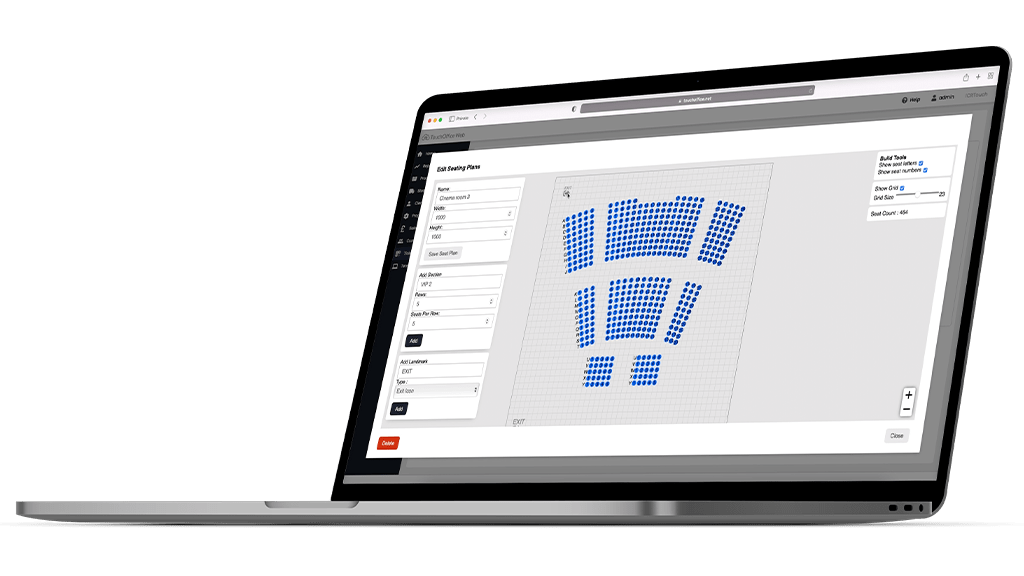
Interactive seating plan
Free or numbered seating — configure your events easily with our visual venue editor.
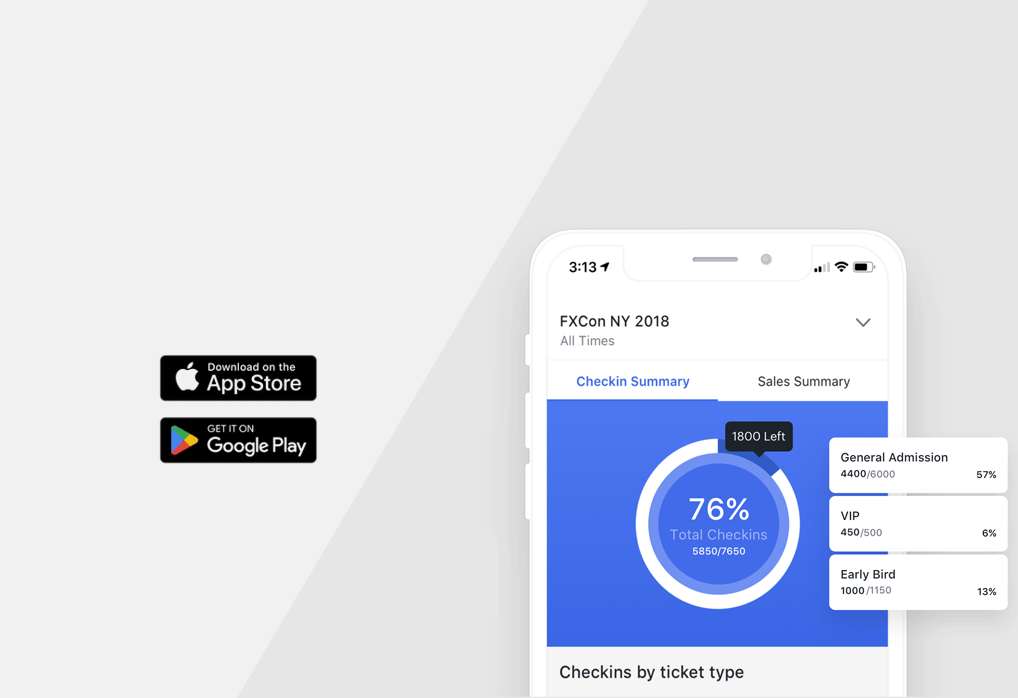
Ticket check-in
Free mobile app to scan QR codes at the door. Android and iOS.

Secure payment
Collect payments online via Stripe. Refunds, real-time tracking — everything is built in.
All features included
Unlimited tickets
Sell as many tickets as you want. No limit, no extra fee.
Seating plan
Intuitive visual editor to build venues with numbered or free seating.
Promo codes
Create promo codes with percentage or fixed-amount discounts.
Web integration
Embed ticketing on your website with a simple iframe widget.
Box office mode
On-site sales interface for counter sales, with or without a printer.
Box office receipts
NF525-compliant thermal receipt printing. Compatible with Zebra, Epson printers.
Customer invoices
Automatic invoice generation with sequential numbering and legal mentions.
Team management
Invite staff with granular roles and permissions (admin, seller, check-in).
QR e-tickets
Electronic PDF tickets with unique QR codes, emailed automatically.
Mobile check-in app
Free Android/iOS app to scan tickets at the entrance of your events.
24/7 support
Support team available every day, all year round. Fast email response.
Reserved tickets
Block specific seats for your invitations, VIPs or box office sales.
Ticket bundles
Offer multi-ticket bundles at preferred pricing (family pack, season pass).
Refund guarantee
Refund guarantee option to reassure buyers in case of unforeseen events.
Contact
Have a question? Let's talk
Our team is available to answer your questions, organize a demo or help you set up your ticketing.

Message sent successfully
Thank you for your message, we will get back to you as soon as possible.
Send us a message
We'll get back to you as soon as possible.